I got tired of fighting my IDE
Every day it’s the same thing. Open VS Code. Open a terminal. Open another terminal. Open the browser. Arrange windows. Lose track of which terminal is running what. Tab back and forth a hundred times between the code, the AI, and the preview
So i just built my own thing
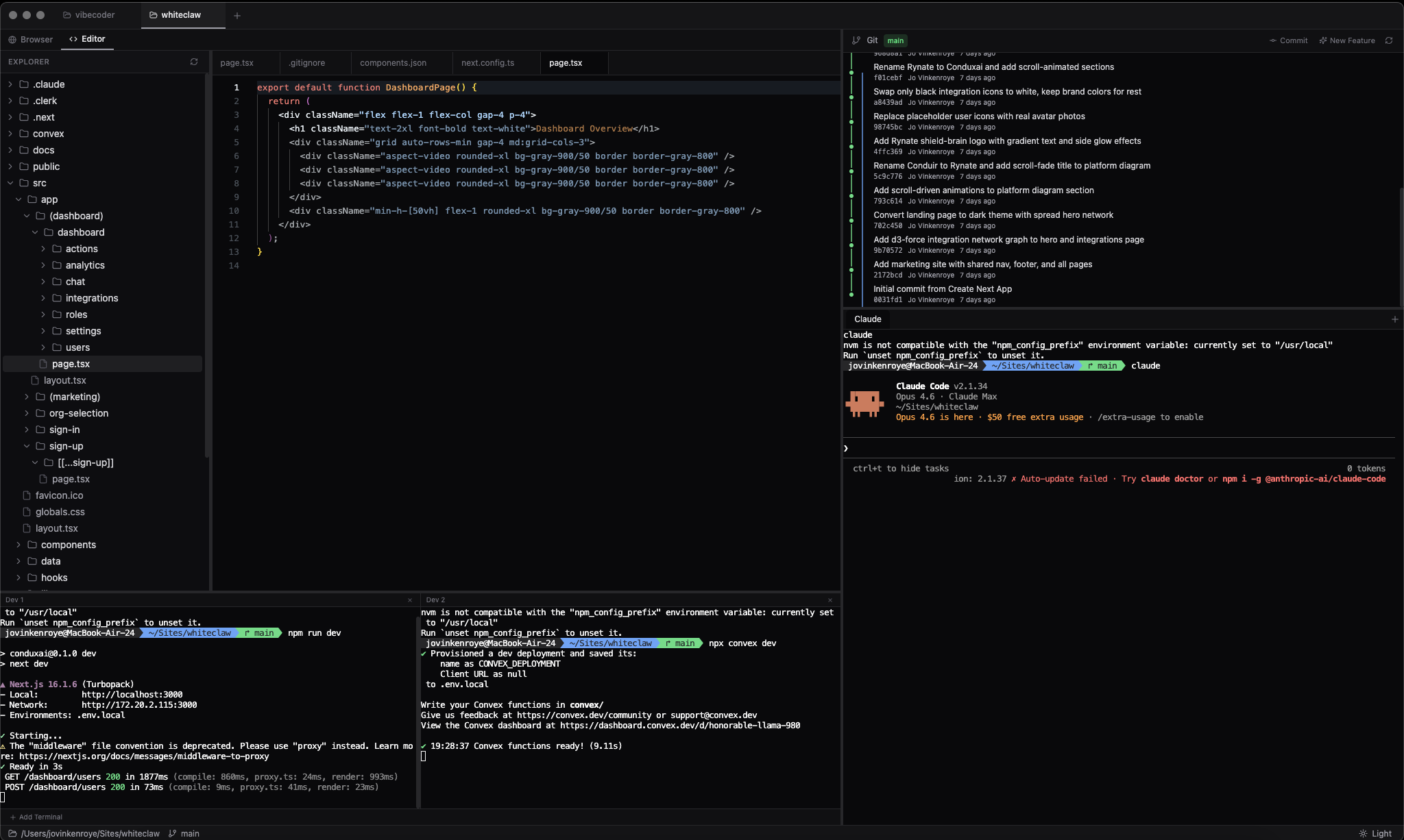
The IDE is dead, long live the AIDE
AIDE stands for AI-Integrated Development Environment. Traditional IDEs were built for a world where humans write every line of code. But that’s not how i work anymore
My workflow now: open a terminal, tell Claude what i need, review what it writes, check the result in the browser. The code editor? i glance at it sometimes. Maybe to understand a type or trace a bug
So VibeCoder flips the traditional layout. Terminals and browser previews take the main stage. Monaco editor is still there when you need it, but it’s intentionally secondary
Terminal-first everything
The terminal panel is the heart of it. xterm.js with WebGL rendering so it’s buttery smooth. Each project gets multiple terminal tabs - one for Claude, others for dev servers, database stuff, whatever you need
The Claude terminal auto-creates when you switch projects. Because in a vibe coding workflow the AI agent is always running
Built it with node-pty for native shell access. Your actual shell, your actual environment, your actual PATH. Not some sandboxed fake terminal
┌──────────────────────────┬──────────────┐
│                          │   Git Graph  │
│  Browser or Editor       │              │
│                          ├──────────────┤
│                          │   Claude     │
│  Dev 1  │  Dev 2         │   Terminal   │
└──────────────────────────┴──────────────┘
Built-in browser with project isolation
Every project gets its own integrated browser with per-project storage isolation. No more cookies leaking between projects. Each one runs in its own Electron webview partition
i hooked into Chrome DevTools Protocol to get network monitoring and console capture without building any custom instrumentation. The browser panel has three devtools tabs: Console, Network, and Passwords
The password manager detects login forms automatically. Injects a script that watches for password fields using MutationObserver, catches form submissions, and offers to save credentials encrypted with Electron’s native safeStorage API
Next time you visit that page it auto-fills
Device emulation switches between desktop, iPad, and mobile viewports with proper user agents. Google OAuth gets redirected to your system browser because Electron webviews and OAuth just don’t mix
Multi-project state that actually works
This was the architectural decision i’m most proud of. Every Zustand store uses a Record<projectId, StateType> pattern. Switching projects instantly shows that project’s terminals, browser tabs, file tree, editor state, and git history
Nothing shared. Nothing leaks. Click a project tab and your entire context switches
Browser tabs persist to disk with a 500ms debounce so you don’t thrash the filesystem. Terminal processes stay alive in the background. Switch back and everything is exactly where you left it
Git graph that talks to your AI
The git panel renders a lane-based commit graph using SVG. Each branch gets its own lane with a color. Merge commits get larger nodes. Bezier curves connect parent-child relationships across lanes
Hit “Commit” and it sends /commit to your active Claude terminal. Hit “New Feature”, type a description, and it creates a properly formatted feature/your-description-in-kebab-case branch via Claude
The git tree isn’t just visualization. It’s a command interface that speaks through your AI agent
Electron, Zustand, and a clean IPC layer
Electron 34 for cross-platform desktop. React 18 + Tailwind CSS 4 for the UI. electron-vite for builds. Zustand for state because Redux is overkill when your stores are this clean
The IPC layer is the backbone. Six handler modules (projects, terminal, filesystem, git, browser, passwords) each manage their own domain. Services like the PTY manager, file watcher, and git service do the actual work. Clean separation between what the user sees and what the OS does
File watching uses chokidar with gitignore-aware filtering. File tree caches and debounces updates. Monaco gets live file sync so external changes from Claude writing files appear in real-time
Steering beats typing
Building developer tools is addictive and humbling. You think you know what you want until you use it for a week and realize the layout needs to change, the terminal needs search, the browser needs password management, and the git graph needs to be interactive
Biggest insight: in an AI-first workflow the dev environment should be optimized for steering, not typing. Large terminal real estate. Easy browser access. Git context at a glance. The code editor is just a reference viewer now
VibeCoder isn’t trying to replace VS Code. It’s built for a different workflow entirely, one where you spend more time directing an AI than editing files yourself
That’s what an AIDE is. Not an IDE with AI bolted on. A fundamentally different tool for a fundamentally different way of building software
What’s next
Still on the roadmap:
- Drag and drop files into Claude terminals (yes there’s multiple per project)
- One-button collapse for dev terminal and console to maximize browser preview
- Console errors with “send to Claude” button
- Detailed network call inspection with “send to Claude”
- Click files and folders in the project tree to send to Claude for easy context input
- Give Claude access to the webview browser so it can manipulate and test the preview
- Many more ideas
Open source and very much a work in progress. Feel free to contribute on GitHub